











Government ABIS
Register people and maintain a reliable biometric system within governmental applications and civil registries.
Multimodal biometric system for large-scale fingerprint matching, iris and face recognition

Innovatrics ABIS is an automated biometric identification system supporting large-scale fingerprint, iris and face matching.
Using powerful proprietary biometric algorithms, Innovatrics ABIS achieves fast and accurate performance with minimal hardware requirements. Modular architecture makes our ABIS solution easy to customize for any use case.
Simple REST API allows systems integrators for smooth and fast integration with any 3rd party system.
Since the first Innovatrics ABIS deployment in 2009, we have successfully deployed our ABIS software to hundreds of identification projects, including some of the most complex multimodal biometric systems worldwide.
Innovatrics high-performing fingerprint, face and iris algorithms are consistently ranked among the best based on independent NIST benchmarks.
Being developed and trained since 2004 in our R&D lab, Innovatrics biometric algorithms offer both, high throughput and matching accuracy on large databases.
Innovatrics algorithms are tested and optimized on well-balanced datasets, powering one of the most flexible and trusted multimodal biometric systems on the market.
Our Technology
Innovatrics ABIS allows system integrators to build an identity management solution tailored to a wide array of use cases.
Innovatrics ABIS is designed to support different applications and configurable dynamic business rules, fully customized workflows, and operational procedures.
Powerful biometric algorithms, which are at the core of our ABIS solution, lower hardware requirements by as much as 60% when replacing legacy solutions as our previous experience shows. The system is designed for on-premise deployment or in cloud.
In cloud installations, you can handle a 100M population on a single AWS instance with a throughput of up to 300 requests per minute.

Our ABIS solution remains always highly operational, supporting efficient data synchronization or parallel installations of Production/Disaster Recovery sites and providing zero downtime.
Using smart ABIS software architecture strategies, our ABIS scales efficiently to meet increasing workloads or number of enrollees.

Designed with system integrators in mind, Innovatrics ABIS software is easy to integrate with any 3rd party solution using REST API.
As big advocates of transparency and openness from the very beginning of our company, our ABIS is technologically-neutral. We ensure our clients don’t suffer from unfair vendor lock-ins and our ABIS can work with any standard database.
See the webinar
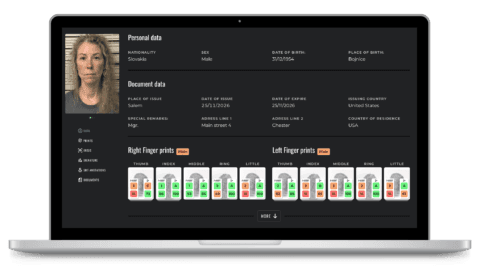
Innovatrics ABIS comes with an intuitive web-based user interface for more efficient performance and quick operator training. Our ABIS solution is packed with smart features including duplicate adjudication, enrollment, administration monitoring, and the searching, editing and browsing of records among others.

Innovatrics support includes a dedicated team of experts instrumental in materializing an ABIS project successfully. A dedicated, experienced solution manager, alongside a project manager and delivery engineer, are assigned to each respective ABIS project.
Our clients can count on them to:

Register people and maintain a reliable biometric system within governmental applications and civil registries.

With a central biometric database of your clients, perform identity checks, prevent fraud and blocklist fraudsters.

Resolve criminal cases, identify suspects, and secure borders using advanced technology and user-friendly interface.
The Innovatrics Automated Biometric Identification System
Download Datasheet
Our passion for technology brings biometric benefits to millions of people.