Authentication definition
Authentication is the process of confirming that a person, device, or system is truly what it claims to be before granting access. In plain language, it answers a single question: “Are you really you?” Once that question is answered, a separate step called authorization decides what you are allowed to do, such as entering a server room, opening a gate, or viewing payroll data.
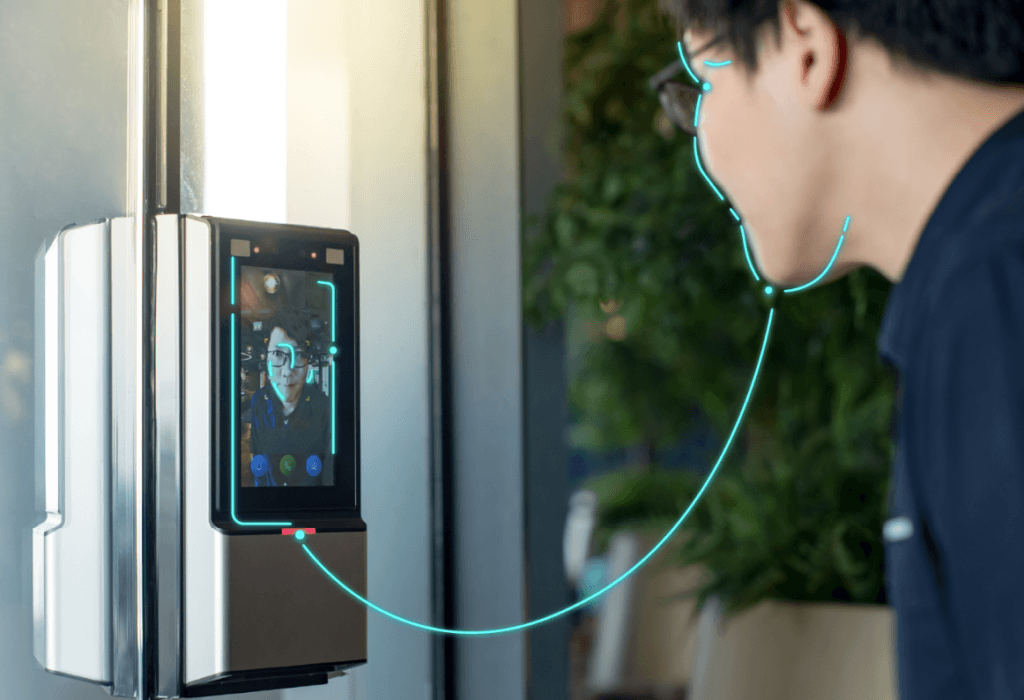
In access control, authentication shows up everywhere. A badge tap at a turnstile, a PIN typed on a keypad, a fingerprint scan at a time clock, a face match at an office lobby camera, a passkey prompt on a laptop, a security key plugged into a workstation. Each is an attempt to prove identity with enough confidence for the risk involved.
Many systems describe authentication methods using three classic categories:
- Something you are: biometrics like face, fingerprint, iris, palm
- Something you have: a token, key card, phone, hardware security key
- Something you know: a password, passphrase, PIN
What’s the Point of Authentication?
Authentication proves control. A user presents one or more credentials, and a verifier checks whether those credentials match what is expected for the claimed identity. In digital systems, NIST describes digital authentication as determining the validity of one or more authenticators used to claim a digital identity, giving reasonable risk-based assurance that the returning user is the same person who accessed the service before.
That returning user idea matters in everyday deployments. A company may do a thorough identity verification once during onboarding, then use faster authentication every day after. In physical access control, enrollment might happen when a new employee is issued a badge and their face template is created. Daily authentication is the tap at the door or the face match at the turnstile.
Authentication is never perfect. It is a probability game managed with controls: better credentials, stronger protocols, smarter policy, strong logging, and careful fallback rules. A tight system reduces false accepts, reduces false rejects, and stays usable enough that people do not invent shortcuts.
What is the Difference Between Authentication, Identification, and Authorization?
These words get mixed up, even in technical conversations. The difference becomes clear with a simple door example:
- Identification: “Who are you?” (The system figures out which identity is present, often without a claim.)
- Authentication: “Prove it.” (The system checks evidence that supports the claim.)
- Authorization: “What can you do here?” (The policy decision: allow, deny, allow with conditions.)
A badge reader often uses identification and authentication together. The badge ID identifies the account. The possession of the badge authenticates, at least weakly. A keypad with a PIN often identifies and authenticates in one step because the PIN both points to an account and serves as proof.
Biometrics adds a twist. A camera can be used for identification (find a person in a watchlist) or for authentication (verify a claimed identity). That difference shapes everything from threshold tuning to privacy risk to how logs are handled. Identity proofing is another related concept. It happens earlier: collecting evidence that someone is who they say they are before creating an account or credential. Authentication is what happens after that user returns.
What are Authentication Factors, and Why do they Matter in Access Control?
Factors matter because each one fails in a different way.
- A password can be phished, guessed, reused, leaked, or shared.
- A token can be lost, stolen, copied, or loaned.
- Biometrics can be attacked with presentation attacks, poor capture, or weak operational controls.
When factors are combined well, a single failure does not automatically mean a breach. That is why MFA is common in higher-risk environments.
In access control, “something you have” remains widespread because it is fast and cheap at the door. Cards, fobs, and mobile credentials fit busy lobbies and high throughput. Token-based systems also produce clean logs for audits. The weakness is obvious: possession does not always equal identity. A stolen badge still opens doors unless another check blocks it.
Knowledge-based factors have the opposite profile. They are cheap to deploy but costly in human attention. People forget PINs. People choose weak passwords. Attackers harvest secrets at scale. That is why many modern deployments treat knowledge factors as a fallback, not a primary control, especially for regulated or high-value systems.
Biometrics offers a strong link to the person. It reduces sharing. It reduces the need to remember or carry something. In access control, it can also remove bottlenecks by enabling contactless entry. It still needs careful design, because biometrics brings data protection obligations and requires defenses against spoofing.
What is Multi-Factor Authentication (MFA), and When is it Worth it?
Multi-factor authentication uses two or more distinct factors, usually drawn from knowledge, possession, and inherence. The goal is simple: make account takeover harder even when one factor is compromised.
MFA is worth it when the impact of unauthorized access is high or when attackers are persistent:
- Corporate admin systems and VPN access
- Critical infrastructure control rooms
- Payment approvals and high-value transactions
- Data centers and restricted labs
- Border control, e-gates, and sensitive government facilities
A good MFA design fits the environment. A warehouse gate may pair a badge plus PIN because gloves and dirt make fingerprints unreliable. A corporate office may pair mobile credentials plus face authentication for convenience and speed. A bank login may use passkeys because phishing is a constant threat.
Many organizations also use step-up authentication. Low-risk actions get low-friction authentication. Higher-risk actions trigger stronger checks. That is common in both digital and physical systems: normal office access might be face-only, server-room access might require face plus badge, and after-hours access might require face plus badge plus PIN.
How does Biometric Authentication Work, and What Data Gets Stored?
Biometric authentication verifies identity using measurable physical traits, most commonly face, fingerprint, iris, or palm. The core steps stay consistent across modalities:
- Capture a sample (photo, fingerprint image, iris image, palm image).
- Extract features and convert them into a template.
- Compare the new sample template to a stored reference template.
- Accept or reject based on a threshold and policy.
That stored template is not the same as storing a photo. It is a numerical representation used for matching. This matters for privacy, security design, and how breaches are assessed.
A key detail from NIST is often overlooked: a biometric characteristic alone is not treated as an authenticator by itself. A biometric comparison is typically used along with a physical authenticator, where the device is “something you have” and the biometric match is “something you are.”
That maps cleanly to real products people already understand. A smartphone unlock uses the phone as the possession factor and the fingerprint or face match as the inherence factor. Many modern access control terminals work similarly: the terminal is a controlled device and the biometric match acts as the personal proof.
Biometric authentication can be extremely usable, but capture quality still matters. Lighting, sensor placement, gloves, moisture, aging, and user behavior all affect outcomes.
Well-designed systems treat this as normal, not as user error. Policies and thresholds are tuned to the environment, not to a lab.
How do Organizations Choose the Right Authentication Level for Each Use Case?
A good decision starts with risk and ends with usability.
NIST formalizes this idea using Authenticator Assurance Levels (AALs), which are tied to how much confidence the system needs that the claimant controls the authenticators bound to the account. Higher AALs require stronger authenticators and stronger resistance to attacks like phishing.
Risk-based thinking also shows up in zero-trust programs. NIST describes zero trust as shifting from perimeter-based defenses toward a focus on users, assets, and resources, removing implicit trust based only on network location. Authentication becomes an ongoing control, not a one-time gate at the network edge.
In the access control industry, the same principle applies. A public lobby and a research lab should not be authenticated the same way. A school entrance and an airport secure zone should not share the same assumptions. The best deployments map authentication strength to impact:
- Low impact: single factor, fast throughput
- Medium impact: MFA for exceptions or after-hours
- High impact: phishing-resistant authentication, strict device controls, strong monitoring
- Very high impact: layered controls, plus human procedures and strong incident response
A practical rule: if authentication failure leads to a safety incident, regulatory breach, or major financial loss, single-factor shared secrets are not enough.